Welcome to Flint! This guide takes you from signing in to sharing your first AI activity with a class. Whether you're new to AI in the classroom or just new to Flint, it should take an afternoon at most.
📋 What you'll get done
- ✅ Signed in to your school's Flint
- ✅ Used a chat with Sparky for your own work
- ✅ Set up your classes, or confirmed they synced from your LMS or SIS
- ✅ Built, previewed and shared your first activity
- ✅ Seen how students did
The captioned walkthroughs follow current controls. The retained overview recording uses earlier designs; follow the written steps for the current UI.
Sparky is the AI in Flint, and you use it in two ways:
- Chats help you with your own work — adjusting reading levels, drafting materials, writing report card comments.
- Activities are experiences you design for students — problem-solving, language practice, debates, assessments — that Sparky runs with them, following your instructions.
Both let you add your own guidelines and materials, which is what makes Flint different from a general chatbot:
A teaching assistant for you 🧑🏫
Somewhere to brainstorm, draft and refine your materials and feedback.
AI your students can use productively 🧑🎓
Sparky guides students rather than doing the work for them, and you can read every conversation.
Personalised learning 🧠
Activities that walk each student through your learning objectives, in any subject and any language, whenever they need it.
Immediate feedback ⚡️
For lessons and file-upload activities with auto-grading enabled, Sparky can give feedback against your rubric after submission. Assessments work differently: teachers review question scores and feedback, then choose when to share results and the answer key.
Go to app.flintk12.com and sign in with your school email address.
If Flint says Select your school to continue., click your school. A school on the free plan has room for 3 teachers and admins. When all 3 seats are taken, Flint can't add you and shows a message under the school: "Sorry, we couldn't add you to {school name}. Its free plan allows 3 teachers and admins, and every seat is taken. Ask one of its admins to upgrade to the school plan." Clicking Join on a school or class in search shows the same message, and for a class it names the class and asks the school's admins to upgrade.
If you have no school to join, or you click I don't see my school, Flint asks you a few questions and then sets up your own workspace:
- Under What best describes you?, choose Teacher and click Continue.
- Read the terms, tick I agree to the Terms and conditions and have read the Privacy policy. and click Accept and continue.
- Under Which school do you teach at?, search for your school, pick it and click Continue. If your school isn't in the search results, choose Use "{the name you typed}" as my school, pick its city under Which city is {the name you typed} in? and click Continue. Depending on your email address, Flint may ask about your school differently:
- If Flint recognises your school from your email address, it asks Do you teach at {your school}? instead. Choose Yes or No and click Continue. No takes you to the school search.
- If your email address belongs to a school district, Flint asks Which {your district} school do you teach at? and searches only that district's schools. If your school isn't one of them, click My school isn't in {your district} to search every school.
- Under Let's set up your first class! What class do you teach?, type a class name, such as "9th Grade Biology", and click Create class.
Flint names your workspace {your first name}'s Workspace, creates the class and opens the class's Overview page. If you joined your school as a teacher and you're not in a class this term, Flint asks you to name your first class in the same way.
On Home, Sparky says hello and you can start a chat or an activity.
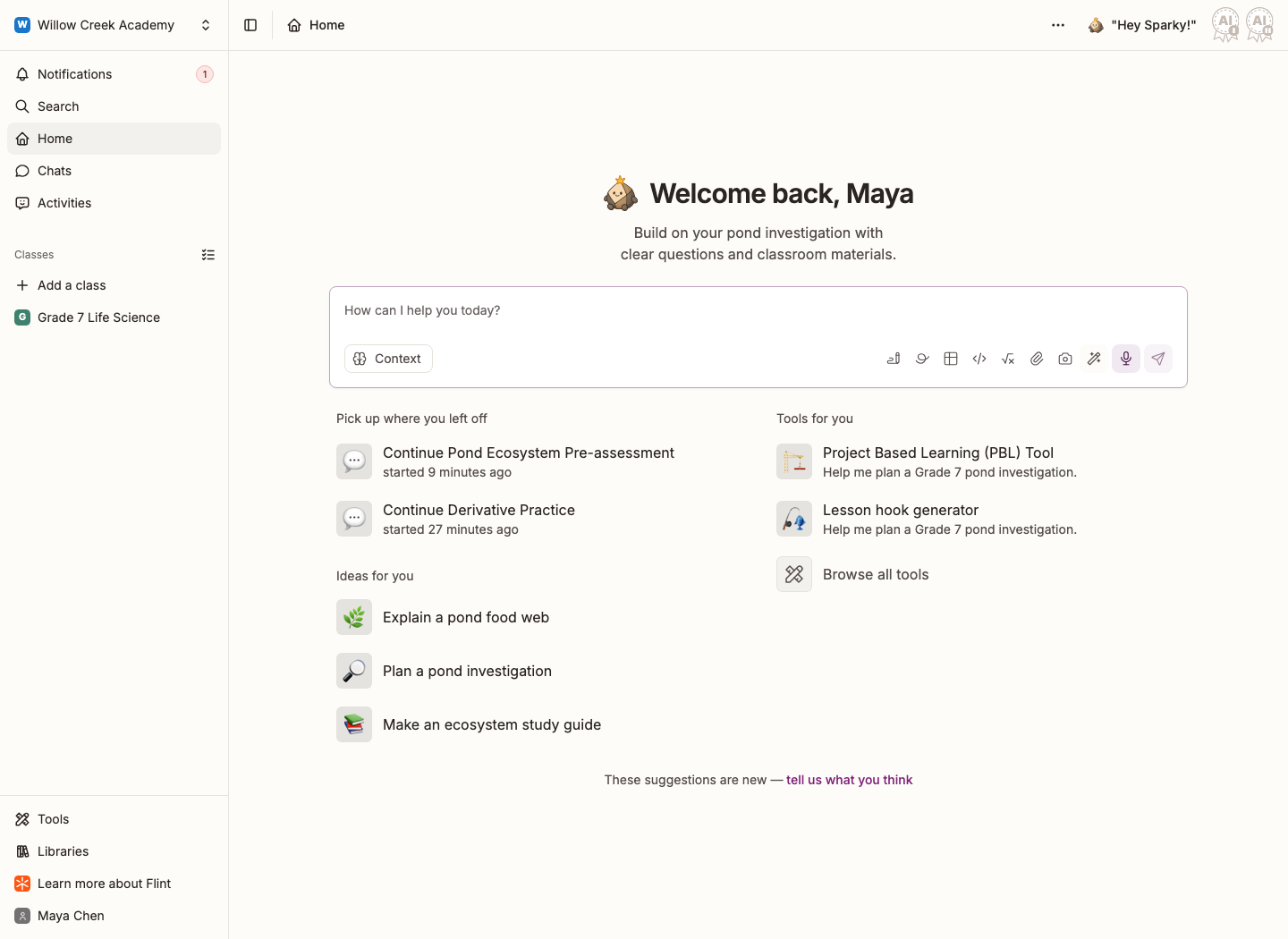
Your students sign in at the same address with their school email. You can also send them a link straight to a class or an activity — see Activities: everything you can do with them.
NOTE: If the top-left corner says {your first name}'s Workspace, you are viewing your personal workspace. Older personal accounts are called {your first name}'s School instead. Click that name and pick your school under Schools. If it isn't listed, ask an admin at your school to add your email address.
| Word | What it means |
|---|---|
| School | Your school's Flint: its people, classes and content. |
| Term | A semester or quarter, usually set up by an admin. Past terms stay available — click your school name in the top-left corner and pick one under Terms. |
| Class | A class, club or any other group you share activities with. |
| Activity | A lesson, structured test or quiz, or file-upload assignment you build for students. |
| Session | One student's conversation in a lesson. File-upload assignments and structured assessments use submissions. |
| Chat | Your own conversation with Sparky, for your work rather than a student's. |
Built activities in a personal space before joining your school? You can move them across.
Click Chats in the sidebar. That opens a fresh chat, with your earlier ones listed under All recent chats beside it. Chats are for your own work:
- Adjusting the reading level of a text for your students
- Drafting worksheets, lesson plans and rubrics
- Writing report card comments and parent emails
- Working through your class analytics
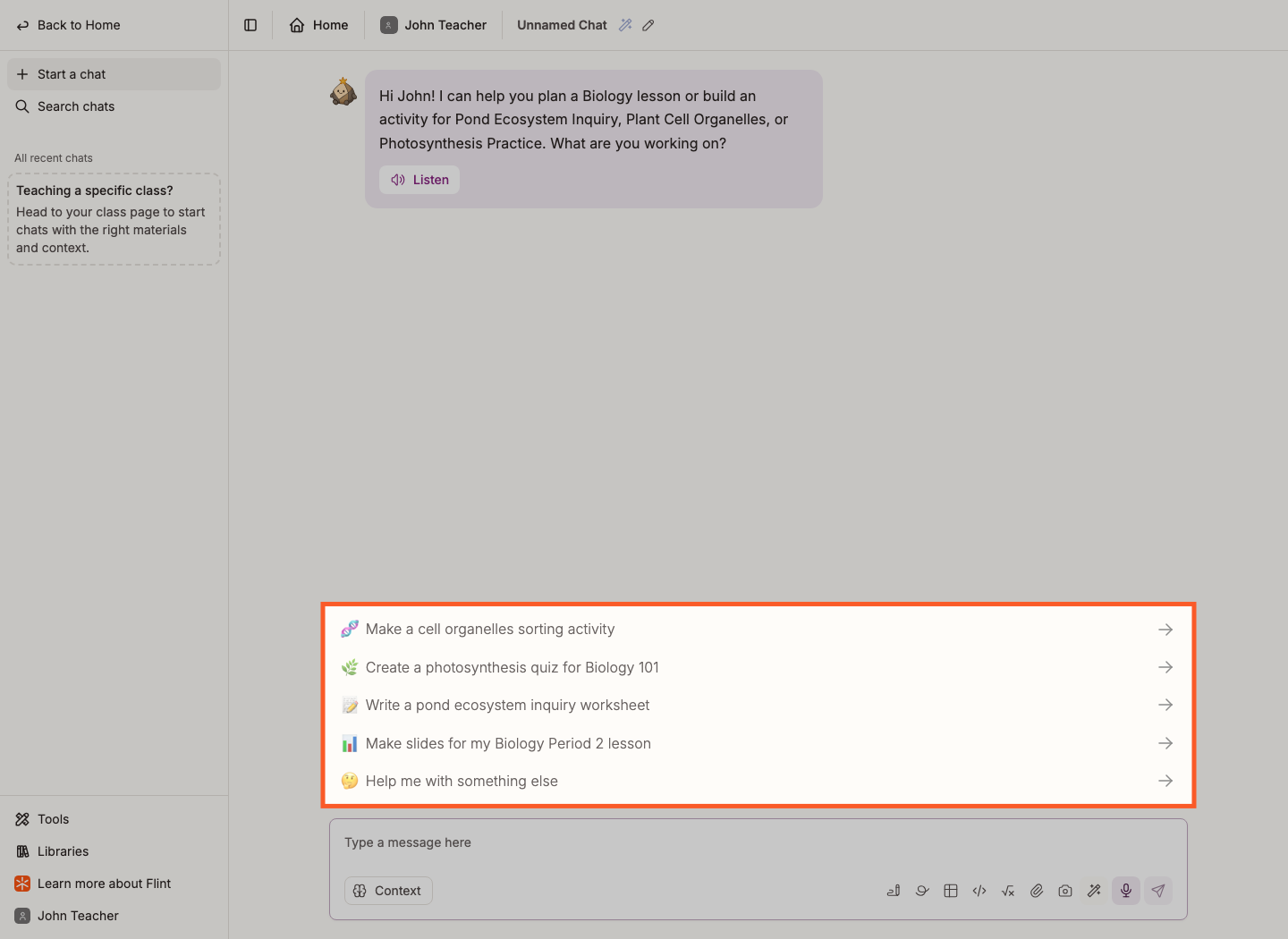
Your chats are listed under Chats so you can pick one back up.
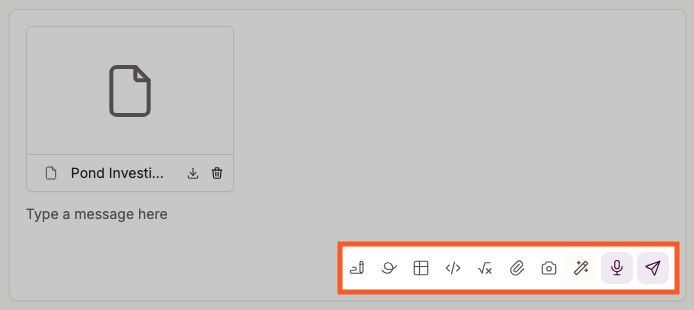
In the chat message box on Home or Chats, the wand (Generate content) lets you choose what Sparky should make. The microphone (Speak message) lets you speak instead of typing when speech input is available, including when the message box is empty. These are chat-composer controls, not controls on every manual activity-settings field. See Uploading content to Flint and Speech settings.
For the full set of things Sparky can do in a chat — documents, slides, images, code, web search — see Tools available when chatting with Sparky.
An activity is a learning experience you design for students: a conversation with Sparky, a structured assessment, or a file-upload assignment. See the use cases page for what teachers build in different subjects.
Click Create activity — it's on the Activities page, and on the Activities page of any class.
Choose Lesson with Sparky, Test or Quiz, or File Upload, then click Start building. Lessons are one-to-one conversations; tests and quizzes have structured questions and points; file-upload assignments let students hand in work for rubric-based review.
Watch: Choose the right activity type before building
If you don't know what you want yet, talk it through in a chat first. When Sparky has sketched something worth building, click its suggested activity card marked Build to open the builder with that idea.
Watch: Turn a chat plan into a saved lesson
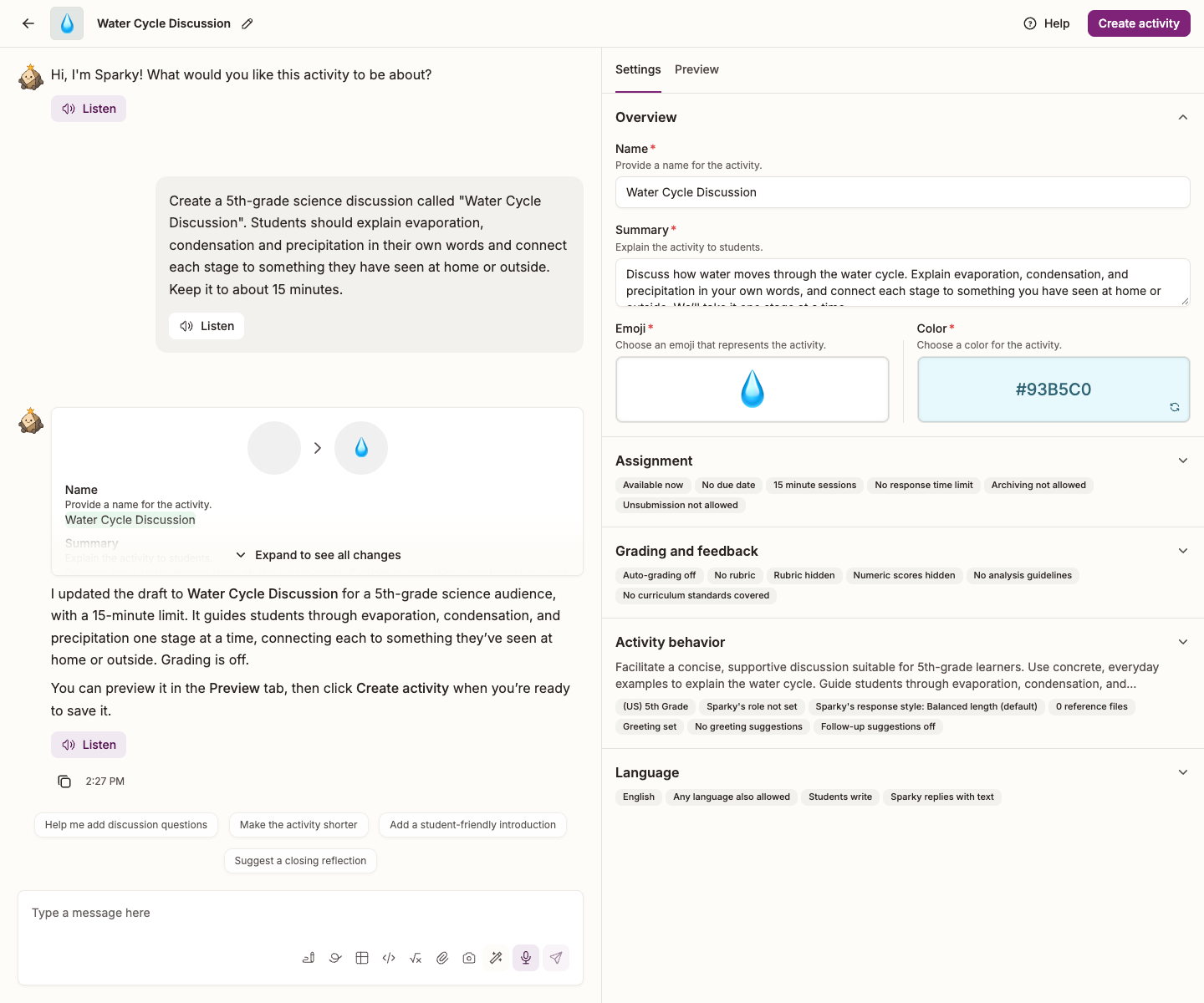
The builder opens with the conversation on the left and the current draft on the right. Tell Sparky what the activity should do, and the draft fills in as Sparky works. The column has a Settings tab and, for lessons, a Preview tab. Tests and quizzes also have Questions.
Attach anything you'd hand a student teacher — a rubric, a vocab list, a textbook chapter, a set of readings. Click the paperclip (Add attachment(s)) to add files or links, or drag them onto the message box.
For a Lesson with Sparky, select the Preview tab beside Settings to try the conversation. Two ways to try it:
- Click the play button to watch a simulated student work through it. Use the grade dropdown next to it to pick how strong that student is.
- Click Try session myself to answer as yourself.
Reset preview, beneath the tabs, starts the preview over. Switching tabs keeps progress; editing the draft resets it.
For a Test or Quiz, review each question, its answer key and points under Questions, then use Preview to check the assessment as students will see it. File-upload activities do not have the lesson's conversation preview; review their instructions and grading settings before sharing.
Anything you want changed, just say so in the builder conversation — "be stricter about showing working", "ask one question at a time", "start in Spanish". Sparky rewrites the relevant settings and shows you what it changed.
Watch: Build, save and try a lesson with Sparky
Watch: Review a quiz draft before assigning it
Watch: Revise a lesson, test the draft and save
The revision walkthrough edits guidelines directly, tests the draft and saves it, rather than asking the builder chat to revise it.
More on previews: Live previews when creating a Flint activity.
Click Create activity in the top right of the page for a lesson or file upload, or Create assessment for a test or quiz. The share window opens after creation; review any assignment confirmation first.
- Under General access, choose who can open it: Open to the displayed audience (or Public), Anyone with the link, or Private. Read the audience description: the nearest more restrictive school, term or class setting bounds access, not always the class.
- Add colleagues in Add names or email addresses, click Invite beside the matching result, and give them Can edit if they should be able to change the activity and see everyone's sessions.
- Click Done to save access changes before distributing the link or code. Reopen Share activity to use Copy link, or Display join code for a six-character code students can type in. The code follows the saved access setting.
Anyone within the allowed audience who obtains a forwarded link or code can use it. Private keeps named and inherited access, along with applicable admin and content-moderator oversight. See Activity access permissions.
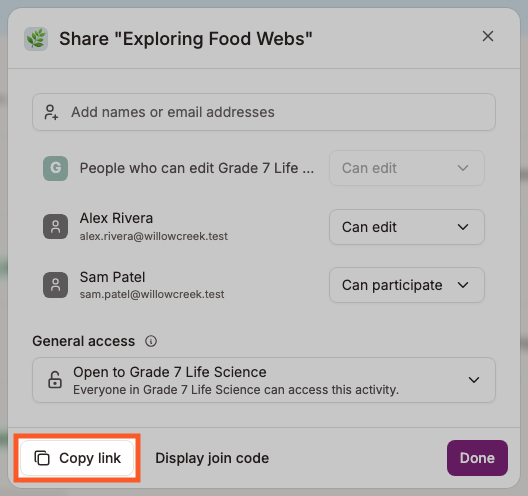
You can reopen this any time with Share activity at the top of the activity page.
For lessons, the activity page lists every session, in progress and submitted, and you can sort it by name, date or grade.
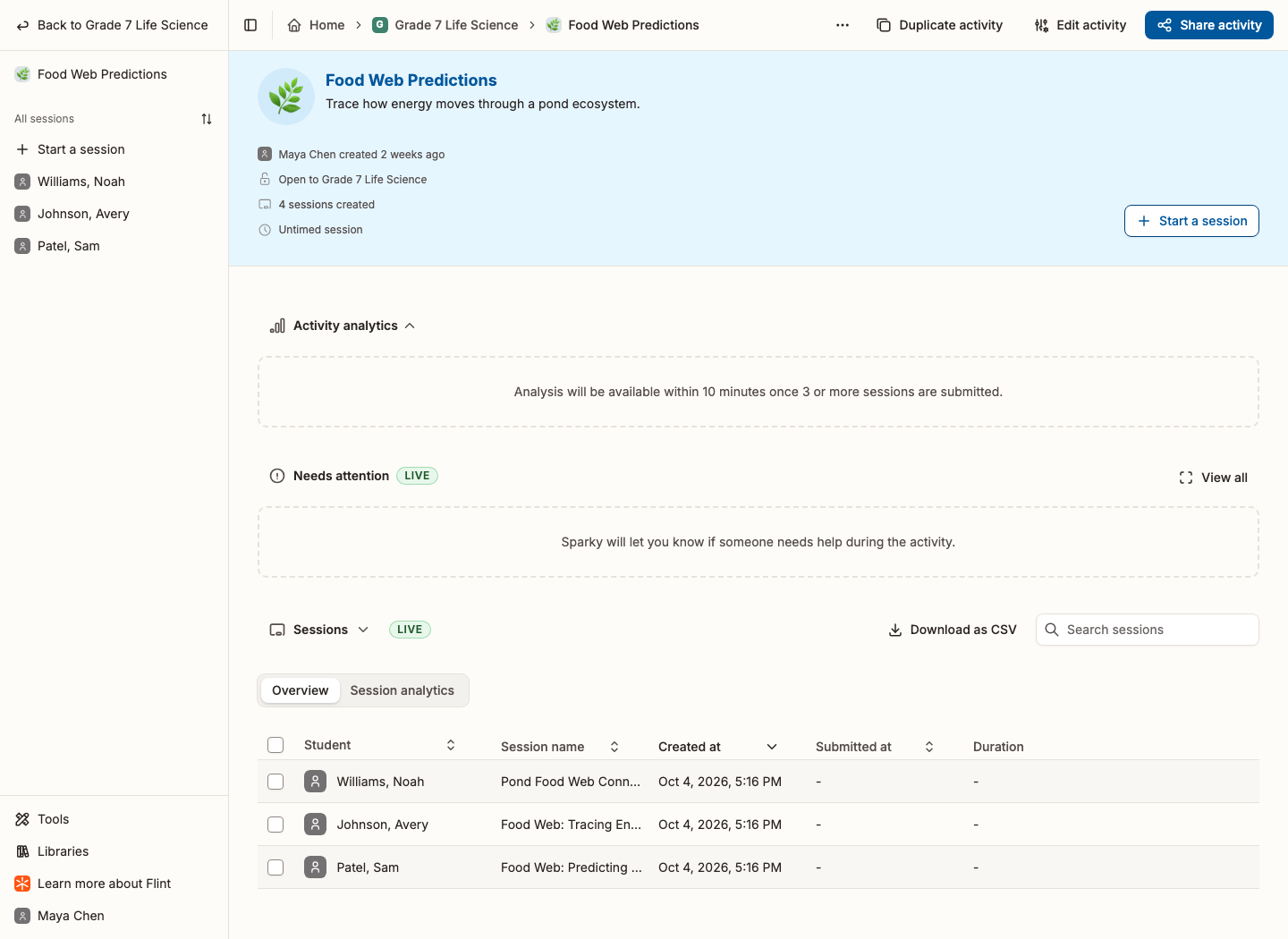
Once three or more sessions have been submitted, an analysis of the whole class appears above the list — Flint says so on the page: "Analysis will be available within 10 minutes once 3 or more sessions are submitted."
Open any session to read the whole conversation, listen to audio if it was a spoken activity, and see the feedback and grade the student received.
Watch: Review a submitted lesson conversation
For a Test or Quiz, open a student's assessment submission to review answers and question scores. Free-response Score fields are editable after auto-grading finishes; machine-graded multiple-choice scores are not editable there, and the overall grade is calculated from question scores. Use Edit feedback to review teacher feedback, then Share results to publish scores and teacher feedback to selected students. Until then, those results remain hidden from them.
Share answer key on the activity page is separate: after submission, it lets students see correct answers, grading guides and available AI analysis. It does not publish teacher scores or feedback. Use Hide answer key to hide it again.
Tips for good activities
- Be specific. Clear learning objectives produce better Sparky behaviour than a topic name.
- Add your materials. Especially for obscure topics, a particular point of view, or anything recent.
- Test it properly. Run the preview at a couple of different simulated achievement levels before you share it. These are rubric grades, not academic school years.
- Expect to revise. Your first version won't be right. Change it after you've seen a few real sessions.
Click Library at the bottom of the sidebar. School library shows what colleagues at your school have published; Public library shows what Flint and teachers worldwide have published. They're free to use and to change.
The library holds activities and resources. Click Activities or Resources in the library's filters to see one kind. Resources are documents, slides and other work that teachers made with Sparky in a chat and published from the chat's share window.
Starting from someone else's activity is usually faster than starting from nothing, and it shows you what's possible.
How to duplicate one
Watch: Make a library lesson your own
- Browse the public library or your school library for your subject.
- Open the library card and click Use activity. If you're signed out, sign in first.
- Choose where the copy goes. Your current term is already selected; add any classes or terms you want, then click Duplicate. If you added a class, the button reads Duplicate and assign. Flint then lists each class with its dates: set Available from and Due date for each class and click Review. The original stays in the library unchanged.
- Flint lists each new copy. Open one and choose Edit activity.
- In the builder, tell Sparky what to change: "Turn this Spanish restaurant roleplay into a French café conversation."
- Preview the changes until it's right.
- Click Update activity, or Update assessment for a structured assessment.
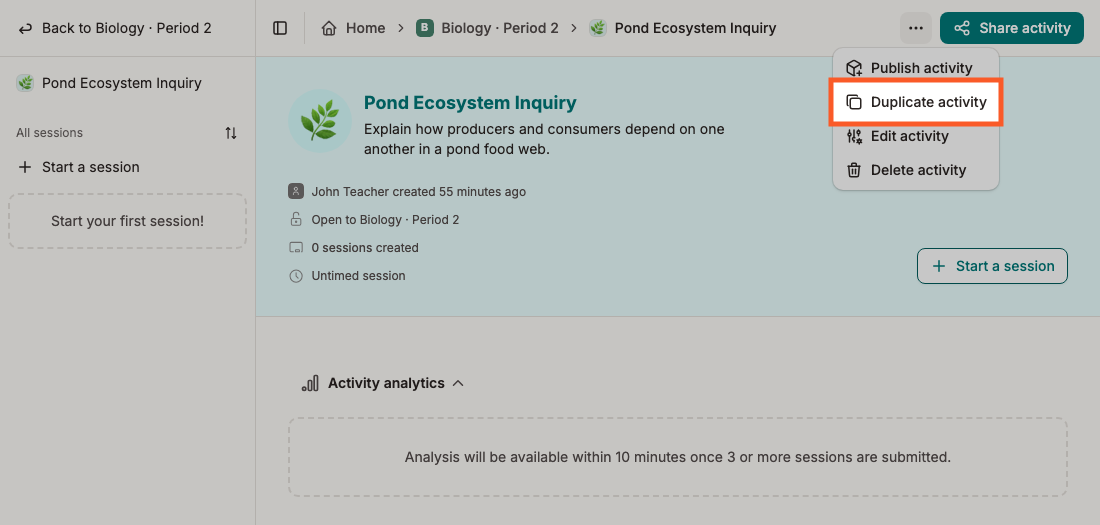
Use activity is also in the ⋯ menu on each library card. On an activity's own page, Duplicate activity opens the same destination picker. See Moving and duplicating activities.
Classes are the highest-leverage thing in Flint. They hold your activities, carry context so you stop retyping it, and are where the gradebook and analytics live.
Why classes matter
- Class context: written once on the class Curriculum tab, and used by every activity in the class.
- Gradebook: one selected submission per student and activity in one table, filterable and downloadable as a CSV.
- Analytics: how the class is doing across all its activities, with Ask Sparky about your analytics for questions like "give me strengths and growth areas for parent-teacher conferences".
- Moderation: choose which categories email you when a message is flagged.
- One place for students: everything you've assigned, in the order you put it.
Setting up classes
If an admin has set up an LMS or SIS integration, your rosters may already be in Flint. Look under Classes in the sidebar. If your classes are listed, you're done — skip ahead. The class you named when you signed up is listed there too.
Watch: Create a class and add reusable context
- In the sidebar, under Classes, click Add a class.
- Click Create in school.
- On the General tab, type the class Name. You can add a logo and colour too, and open the Moderation and access tab to set who can find the class.
- Click Create. The class opens on its People page.
- Click Add people to add students by email address or CSV, or send them the link with Share class.
Learn more: Making a new class in Flint | Inputting class context | Moderation in Flint
Classes: Curriculum
What is it?
The Curriculum tab is where you tell Sparky about this particular class. Class context takes up to 5,000 characters and applies to every activity in the class, so you write it once instead of in every activity.
Why it matters
It shapes how Sparky talks to these students: their level, their needs, and the ground rules you want kept.
How to do it
- Open the class and click Curriculum in the class sidebar.
- Type into Class context. For example: "9th grade algebra. Two students have dyslexia — keep explanations short and avoid dense paragraphs. Always have students attempt a problem twice before helping."
- Click outside the box. It saves on its own.
Below it, Class curriculum is where you can import your course materials so Sparky can tailor activities, feedback and grading to them.
Classes: moderation
Watch: Review a class’s existing alert settings
The walkthrough reviews existing categories and frequency, then cancels without changing alert settings.
What is it?
Moderation categories for email notifications decides which kinds of flagged message send you an email. Every category is on to begin with.
Why it matters
It's how you hear about anything concerning in a student's conversation, including self-harm, without reading every transcript.
How to do it
- Open the class and click Settings in the class sidebar.
- Scroll to Moderation categories for email notifications.
- Tick the categories you want to be emailed about. Self-harm notifications cannot be switched off once enabled and are always sent immediately.
- Check Alert frequency: School default inherits your school's schedule, or choose Immediately, Hourly, Daily or Weekly for other alerts. Click Save.
The walkthrough reviews the class's existing Alert frequency without changing it.
Using your class
A class opens on its Overview page, the first item in the class sidebar. Activities, Chats, Resources and Gradebook come next. As the class's owner you also see People, Curriculum, Analytics and Settings.
At the top of Overview, Invite people opens the class's People page, and View join code shows the code students type to join.
Daily brief from Sparky tells you what is happening in the class today: activities due soon and how many sessions they have, flagged messages, or standards waiting for approval. The brief ends with one thing Sparky offers to do for you. Click Let's chat to open a chat that asks Sparky to do it. Click the brief's heading to fold it away. Only the class's owners see the brief.
Below the brief:
- Upcoming activities lists activities due in the next 7 days and how many sessions each has. The icons beside the heading are Create activity and See all class activities. Hover over an icon to see its label.
- Pinned resources shows the resources you pinned on the class's Resources page. The icon beside the heading, See all class resources, opens that page.
- Announcements shows the class's three newest announcements, with See all announcements below them.
- Needs attention shows a card when students sent inappropriate messages, and a Set class context card until you write the class context.
- Class details counts the class's students, standards and curriculum materials.
Announcements are messages to everyone in the class, such as reminders and trip details.
- Open the class's Overview page. Under Announcements, click Post announcement, or the + (New announcement) once the class has an announcement.
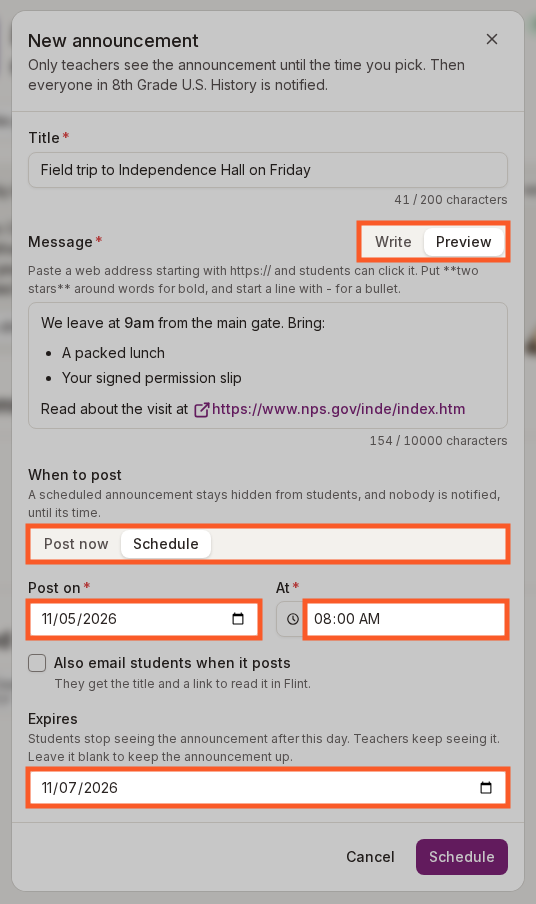
- Type a Title and a Message. A web address that starts with https:// becomes a link students can click. Put two stars around words for bold, as in
**Friday**, and start a line with - for a bullet. - Click Preview above the message to see the links, bold text and bullets the way students will see them. Click Write to go back to editing.
- Under When to post, keep Post now, or choose Schedule and pick a Post on date and an At time.
- To take the announcement down from students' screens on a set day, pick an Expires date. Leave Expires blank to keep the announcement up.
- Click Post. For a scheduled announcement, the button says Schedule.
When you post, everyone in the class gets a notification under Notifications in the sidebar. In an unpublished class, only the class's teachers get one; students see the announcement once you publish the class.
A scheduled announcement stays hidden from students until its date and time, and nobody gets a notification before then. Teachers see it on the class's Overview marked Scheduled for with the date and time. At that time Flint posts the announcement and notifies the class. Flint doesn't ask about email for a scheduled announcement. In a published class, tick Also email students when it posts before you click Schedule, and the students get the email as soon as the announcement posts. To post a scheduled announcement early, open it, click Edit, choose Post now and click Post.
After its Expires date, students no longer see the announcement on the class's Overview, in the class's announcements or in their notifications. Teachers keep seeing it marked Expired with the date, and can no longer email it to students. To show it to students again, open it, click Edit, move or clear the Expires date and click Save.
When you post right away in a published class, Flint then asks whether to email the announcement to the students. The email holds the title and a link to read the announcement in Flint. To email it later, open the announcement and click Email students, or Email again to send it a second time. The same window has Edit and Delete. To change an announcement, click Edit, make your changes and click Save. If the announcement has already posted and hasn't expired, you can tick Notify the class about this change before you click Save, and the class gets a new notification.
The class's Resources page holds files and links for your students. Students can open them but can't add their own.
- Open the class and click Resources in the class sidebar.
- Click Add resource, then Add link or Add file.
- Open the menu on a resource to Pin to top, which also shows the resource under Pinned resources on the class's Overview page. Hide from students keeps a resource for teachers only.
Resources in the main sidebar lists the resources you made and the ones shared with you. Filter by All resources, My resources or Shared with me. Documents, slides and simulations you make with Sparky show up there.
🎉 You're ready
That's the setup done. Everything below is for when you want to go further.
Going further
1. Click "Create activity"
It's at the top of the Activities page, in a class or across your whole school.
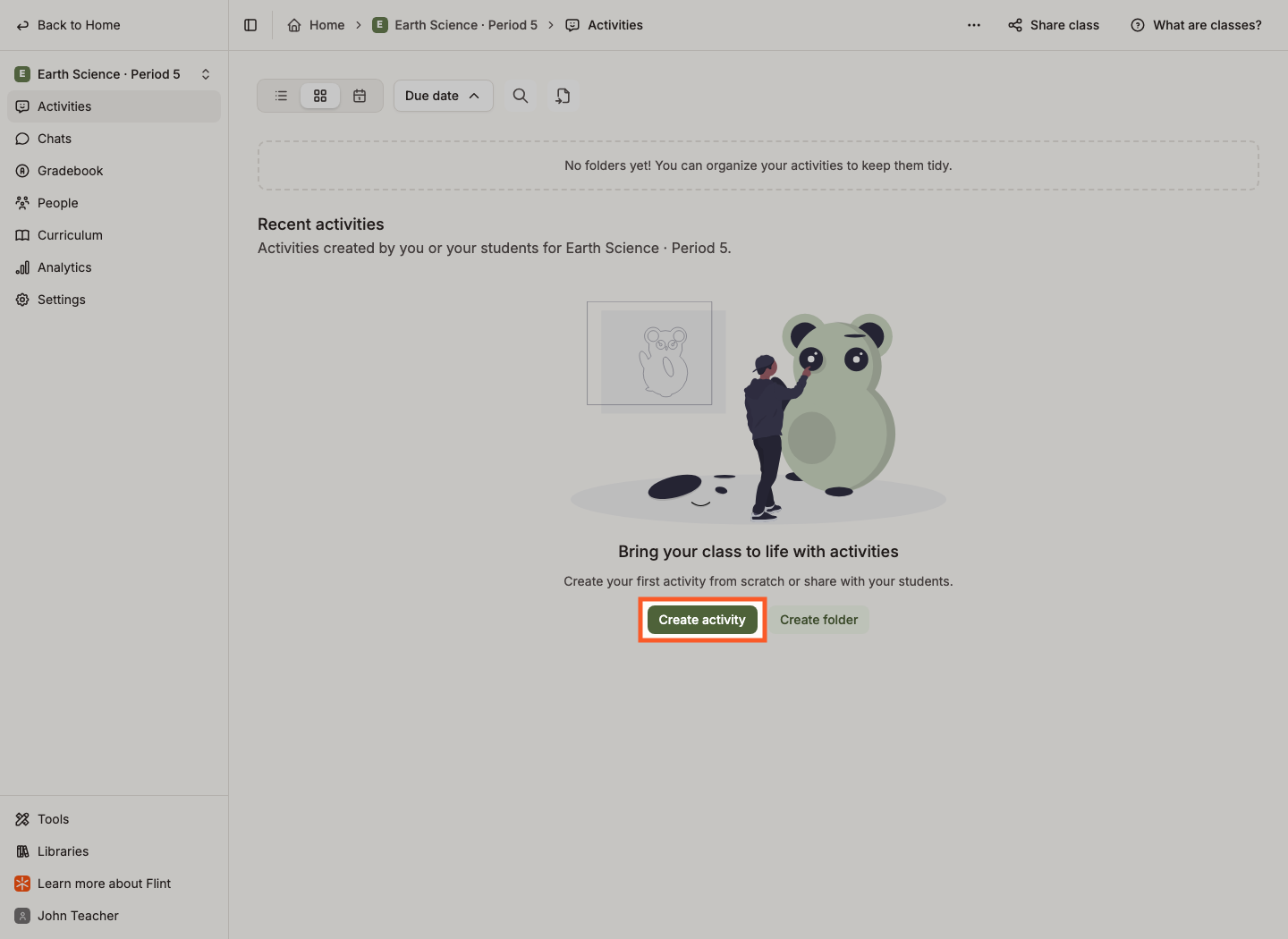
Choose Lesson with Sparky, Test or Quiz or File Upload, then Start building.
2. Tell Sparky what you want to make
Describe the topic and how students should interact with Sparky. It asks follow-up questions until it has what it needs.
Attach your teaching materials here too — see "Adding your own materials" below for what's worth uploading.
Need ideas? Browse the public library or the use cases the Flint team has put together.
3. Preview, then revise
For lessons, select the Preview tab beside Settings: the play button runs a simulated session at a rubric achievement level you choose, not an academic school year, and Try session myself lets you answer as yourself. For tests and quizzes, review Questions and use Preview instead.
Then type the change you want, and Sparky updates the settings for you.
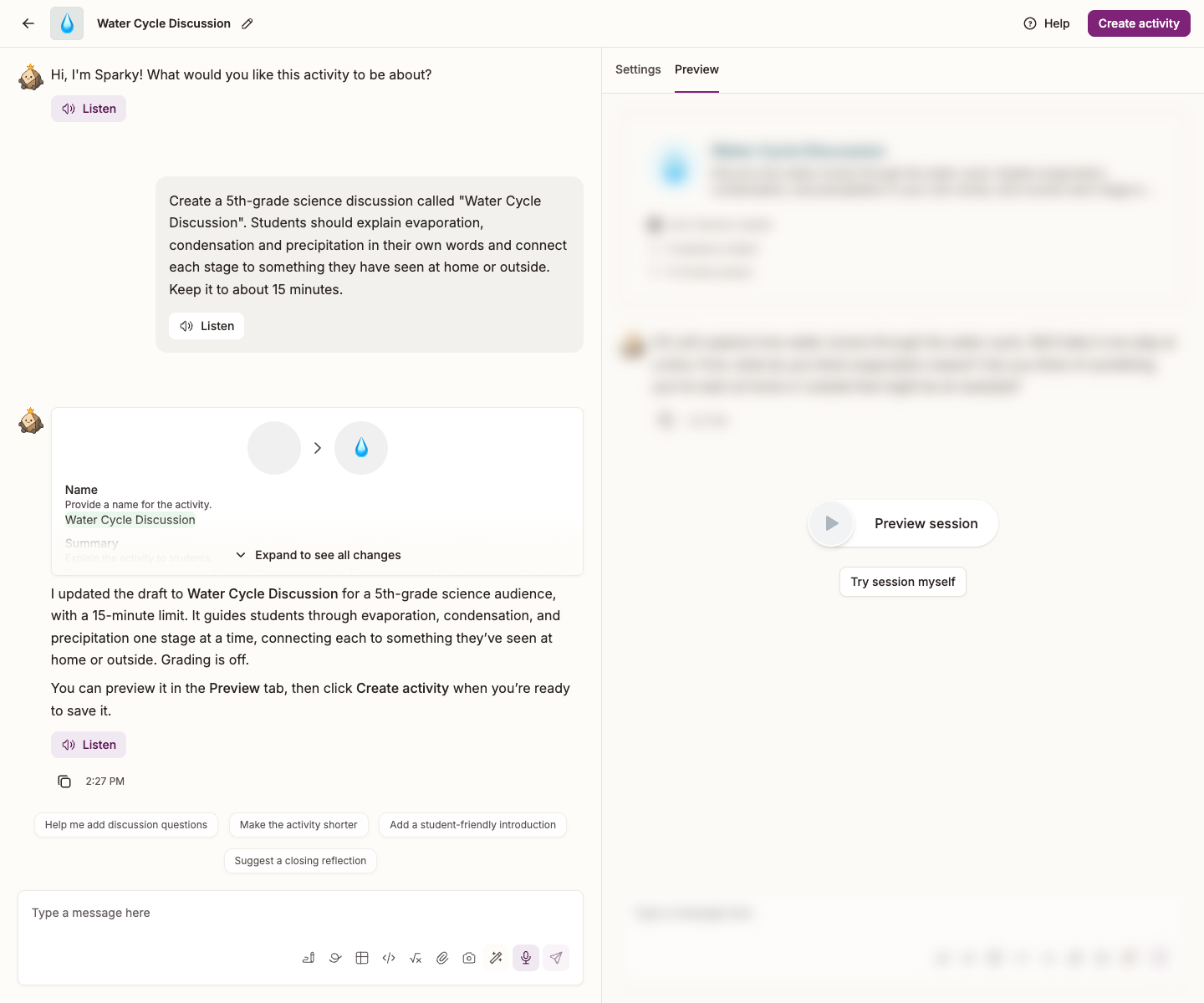
Optional: edit the settings yourself
Settings is open beside the conversation; expand a section to edit it. Collapsed sections summarize the current draft. Lessons have Overview, Assignment, Grading and feedback, Activity behavior and Language sections. File uploads have the first three. Assessments have Overview and Assignment, with Questions and Preview tabs in the same column.
The conversation and settings edit the same draft. Switching to Preview preserves your preview progress; editing the draft resets it. The button in the top right of the page saves your work: Create activity / Update activity for lessons and file uploads, or Create assessment / Update assessment for tests and quizzes.
When you attach materials, Sparky is instructed to prioritize them and use its general training to fill gaps. Check the resulting answers; uploading sources does not guarantee factual accuracy.
So materials matter most for activities involving:
- An obscure topic the model may know little about.
- A specific point of view you want represented.
- A current or fast-moving topic, where the model's general knowledge will be out of date.
What you can attach:
- Files and links — PDFs, documents, spreadsheets, slides, images and audio. Click the paperclip (Add attachment(s)) to add them from your computer, from Google Drive or OneDrive, or from anything you've attached before.
- Things you make in the message box itself, from the buttons next to the paperclip: Create a document, Create a whiteboard, Create a spreadsheet, Write code, Insert an equation and Take a photo.
- Generate content, where available in the chat composer, asks Sparky to make content rather than opening an attachment for you to write yourself. Choose a format, describe what you need, and send your message.
YouTube links are not currently supported as attachments. Copy the transcript into a document and attach that instead. The illustrated toolbar is a composer example; manual settings fields do not all have wand or microphone controls.
How much you can attach depends on your school's plan — paid plans take roughly three times as much text per file as the free plan. If a file is too big, Flint tells you; split it into parts and attach those.
The rule of thumb: more is better. Your materials tell Sparky the reading level, the depth and the expectations you have, in a way a description can't. Think of it as briefing a new teaching assistant.
💡 A class can be a course, a department, a club — any group of people you share things with.
When you create a class, you become its owner — shown as Can edit in sharing controls — which lets you change its settings, see its analytics and add people. Teacher is your school role, not a substitute for ownership of a particular class. See Roles in Flint.
In the sidebar under Classes, click Add a class and then Create in school. Drag the classes in the sidebar to put them in the order you want.
Open a class and click Analytics in the class sidebar.
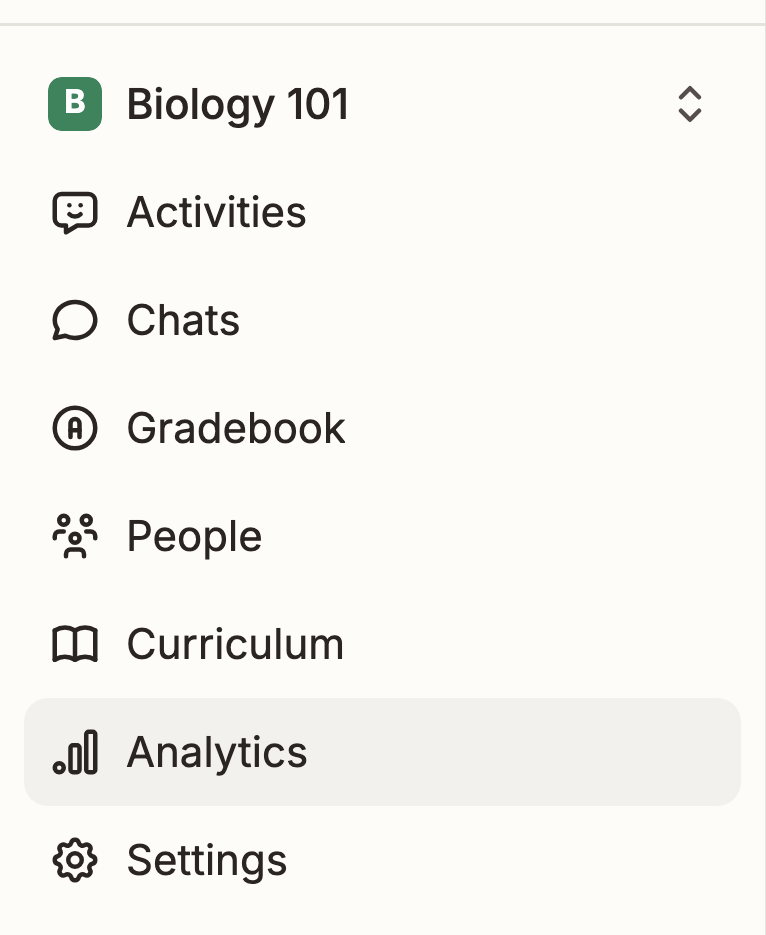
The Usage tab shows the headline numbers and snippets from student sessions. Ask Sparky about your analytics opens a chat over the same data, so you can ask things like "how has this student changed since September?" or "what do students keep getting stuck on?"
Watch: Choose the analytics tab for your question
The walkthrough compares the tabs and their notices, not a populated mastery report or an Ask Sparky analysis.
The Alignment tab compares student work against Bloom's taxonomy and against your curriculum, and Outcomes reports how the class is doing against your standards.
Two ways, for two different situations:
- Duplicate it — best when they should have their own copy, with their own students' sessions kept separate from yours.
- Give them "Can edit" — best when you want to build or run it together.
To duplicate, open the activity's action menu and choose Duplicate activity. Select the destination school, term or class, then click Duplicate, or Duplicate and assign if you picked a class. For a class, set the copy's Available from and Due date, then click Review. Open the resulting copy and choose Edit activity to rename or revise it; save with Update activity or Update assessment.
To share the original, click Share activity, search for your colleague's email address, click Invite beside the result, and set their access to Can edit. Click Done to save. They can then change the activity and see everyone's sessions.
Watch: Give a colleague editing access to an activity
Open an activity's menu and choose Publish to library, or click Publish activity at the top of the activity page, to share it beyond your own classes. Select one or more available libraries — your school's, your district's where available, or the public one. Anyone who duplicates the activity can view its settings. Review Confirm content compliance and ownership, tick the confirmation that the activity contains no sensitive, personal or copyrighted content, then click Publish.
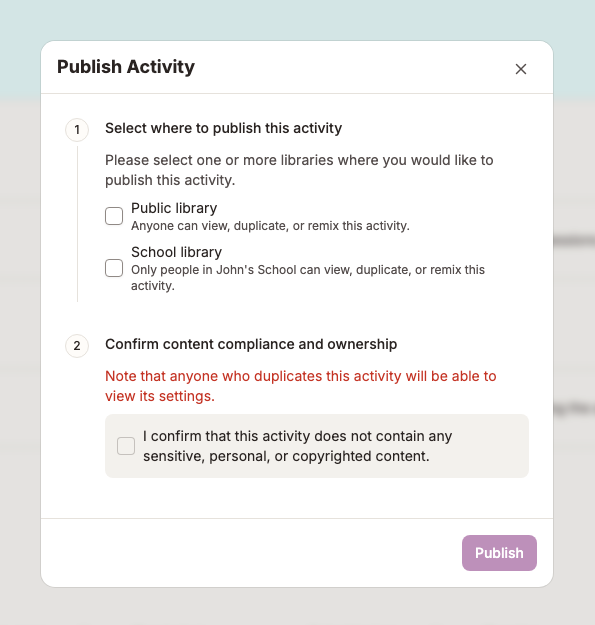
The public library holds activities published by the Flint team and by teachers at other schools around the world. They're all free to use and to remix.
What is it?
One selected submission for each student and activity in a class, in one table. The latest eligible attempt is selected by default; for rubric-graded activities, only attempts with an overall grade are included. It saves opening each activity in turn to see where a student is.
Why it matters
It's the fastest way to spot a pattern: a student who's slipped, a concept the whole class struggled with, a group who need extending.
- Open the class.
- Click Gradebook in the class sidebar.
- You get a table of students down the side and activities across the top.
- Click an activity name for its analysis, or a single grade to open the student's session or submission.
If a student has multiple graded attempts, use the grade cell's Show other submissions dropdown to select earlier work.
Watch: Find the work you need in Gradebook
- Sort by a column by clicking the arrow next to an activity's name.
- Sort students by Last name, first name A–Z, First name, last name A–Z or their reverses, from the menu on the student column.
- Click Filter at the top right to narrow the table to particular students or activities.
- Click a student's grade in the gradebook.
- For a lesson, that takes you to their session; change the grade at its top right. For a file upload, open Edit feedback on the submission to review and change rubric grades.
- For an assessment, it opens the submission. Adjust editable question-level Score fields after auto-grading finishes; the overall grade is calculated, not edited in the header. Use Share results when scores and teacher feedback are ready for students.
Watch: Review and save a lesson grade override
Watch: Review and refine file-upload feedback
Watch: Review quiz scores without releasing results
The walkthrough reviews scores without sharing results or the answer key.
Click Download as CSV at the top of the gradebook to take the current table into your own spreadsheet or school gradebook. The export reflects your filters and selected submissions, not every historical attempt.
More resources
- Flint 101 course — self-paced, covering activity creation, customising Sparky, analytics and collaboration.
- Flint How-Tos on YouTube — short videos on single features.
- Help center articles for teachers — detailed guides on any topic.
- AI Literacy course for teachers — a free, self-paced course that adapts to what you teach; each of its two levels earns you a shareable certificate. Open Learn more about Flint in the sidebar and choose AI Literacy for Teachers · Level 1 or Level 2. This is separate from the community-hosted Flint 101 course.
Activity ideas:
Getting help
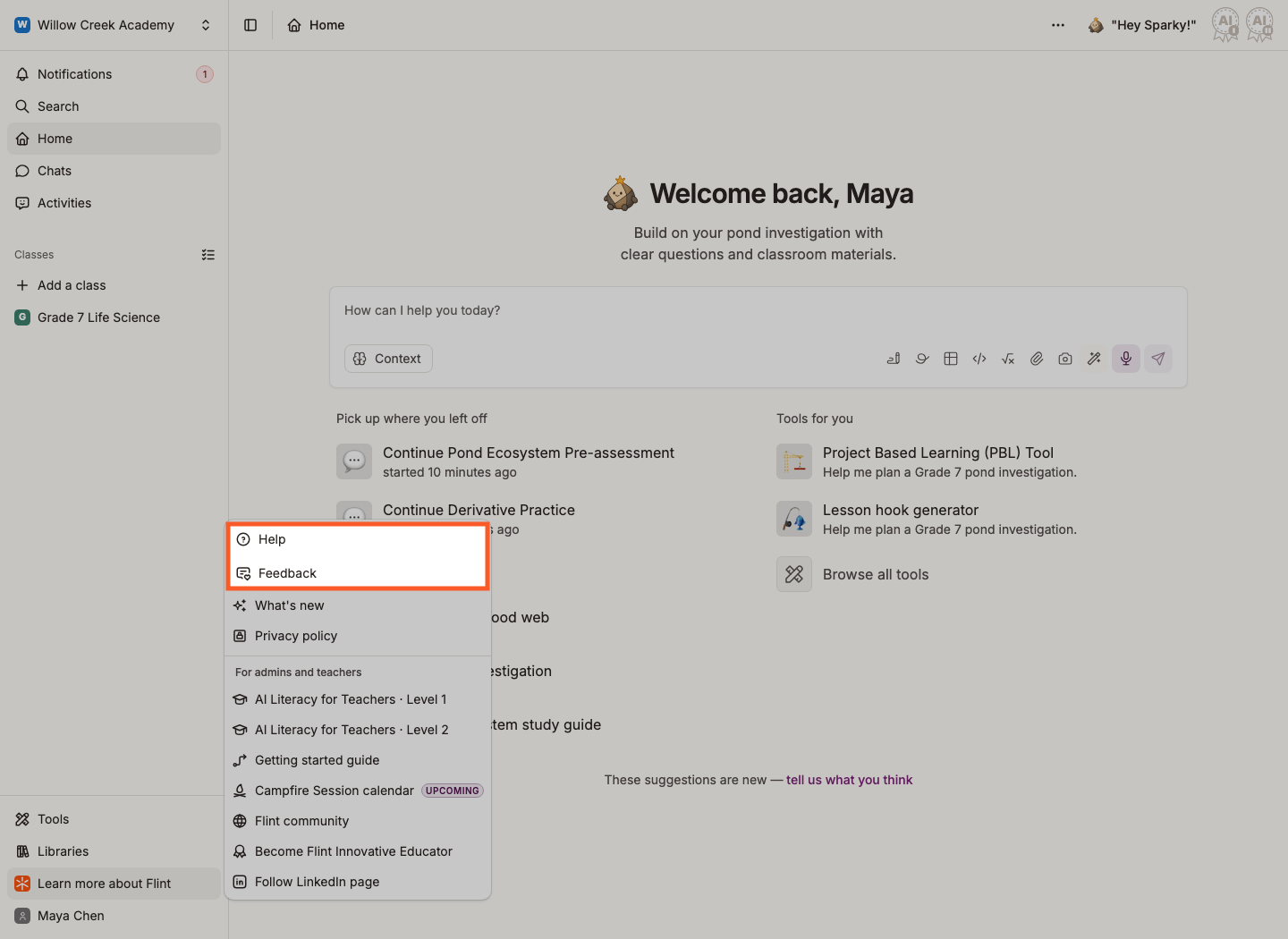
Click Learn more about Flint at the bottom of the left sidebar, then Help to ask us a question, or Feedback to send us an idea. See How to get live help in Flint.